
Found a pet?
Thank you for stopping to help.
If the pet is wearing a red Riley Tag, you can reach their owner in seconds. If not, here’s what to do next.
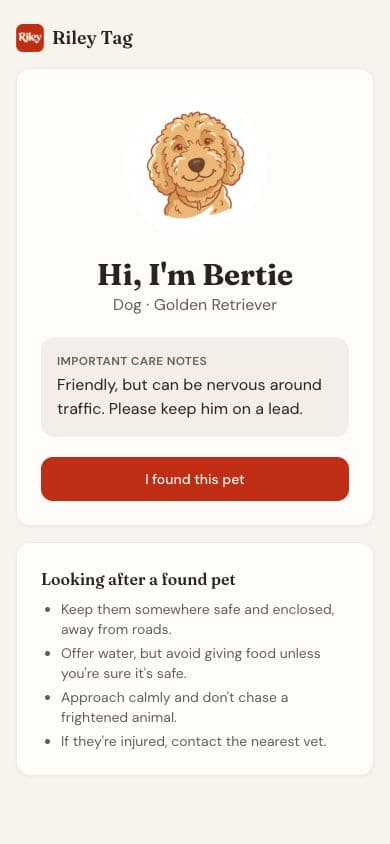
Wearing a Riley Tag?
Scan the tag
Point your phone camera at the QR code on the red Riley Tag. The pet's page opens in your browser. No app needed.
Read the care notes
The owner may have left notes, like 'nervous, please don't chase' or 'needs medication'.
Message the owner
Tap 'I found this pet' and leave a message with how they can reach you.
Share where you are
If you're happy to, share your location so the owner knows where to come.
Your message goes to the owner privately. Riley doesn’t show you the owner’s address or, unless they choose, their number.
No Riley Tag?
- Check for an engraved tag. Dogs in the UK must wear one with the owner’s name and address.
- Any vet can scan for a microchip, usually free of charge.
- For dogs, contact the local council’s dog warden service if you can’t reach the owner.
- Post a photo on local community groups, saying where you found them.
Questions, answered
Finder questions
Do I need to download an app to scan a Riley Tag?
No. Your phone's camera opens the finder page in your browser. You'll need a data connection.
Will the owner see my phone number?
Only the contact details you choose to include in your message.
The page says the tag is inactive. What now?
The owner's subscription may have ended. Check for an engraved tag, ask a vet to scan for a microchip, and for dogs, contact the local council's dog warden.
What should I do while I wait?
Keep the pet somewhere safe and enclosed, away from roads. Offer water, but avoid giving food unless you know it's safe. If they're injured, contact the nearest vet.